
Translate Website | Traducir Sitio Web
- Home
- About the AG
- In the News
- /Careers
- Services & Information
For Businesses
Submit Data Security Breach - Programs A-Z
Resources
- Contact Us
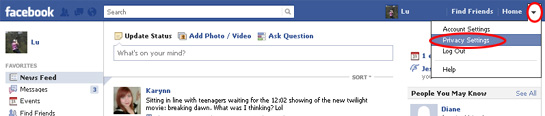
Step 1: Click on the "V" in the upper right corner
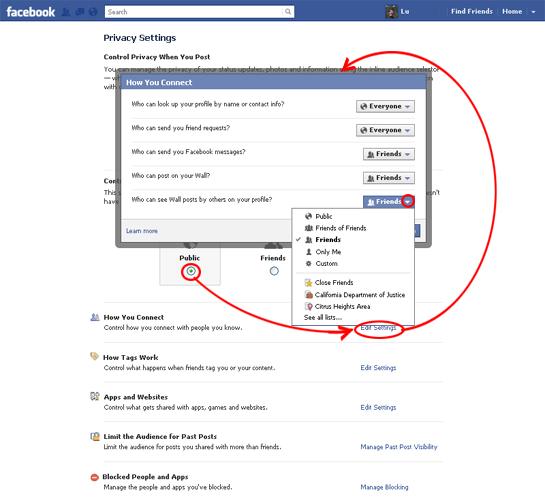
Step 2: With Public selected, click on "How you Connect, Edit Settings". A pop-up will appear, choose the settings you wish.
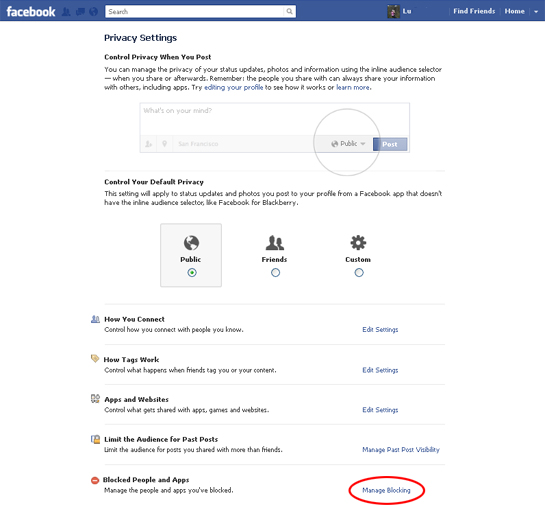
Step 3: With Public selected, you can review your "Blocked People or Apps", click on "Manage Blocking".
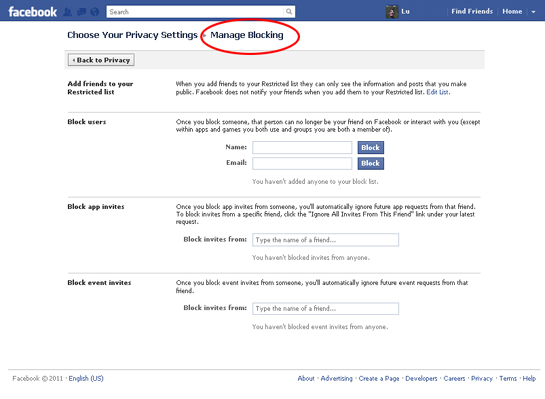
Step 4: Review or edit your "Blocked People or Apps".
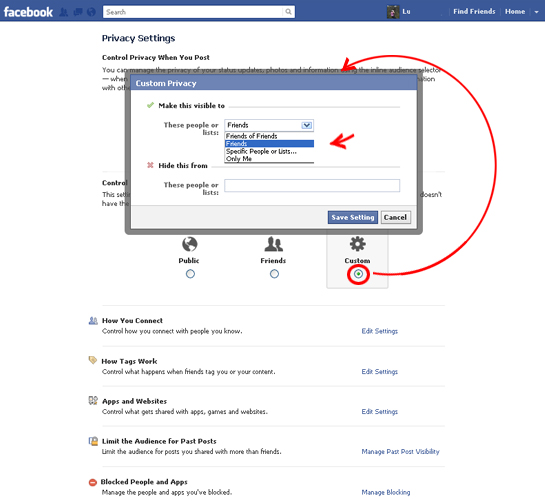
Step 5: With Custom selected, a pop-up will appear, choose the visible or hide settings you wish.
This Google™ translation feature is provided for informational purposes only.
The Office of the Attorney General is unable to guarantee the accuracy of this translation and is therefore not liable for any inaccurate information resulting from the translation application tool.
Please consult with a translator for accuracy if you are relying on the translation or are using this site for official business.
If you have any questions please contact:Bilingual Services Program at (916) 324-5482
A copy of this disclaimer can also be found on our Disclaimer page.
Close this box or use the [ X ]